

What is ChatGPT to Webflow Conversion?
Transform your ChatGPT-generated HTML, CSS, and JavaScript into professional Webflow components with our powerful AI-to-Webflow conversion tools. Our HTFlow Custom GPT and HTFlow Webflow App create a seamless workflow from AI-generated code to production-ready websites.Why Use ChatGPT to Webflow?
- Speed Up Development: Convert AI-generated code to Webflow components in seconds
- Maintain Quality: Generate clean, semantic HTML optimized for Webflow Designer
- No Coding Required: Use simple prompts to create complex web components
- Professional Results: Get production-ready, responsive designs every time
Requirements for ChatGPT to Webflow
To get started with converting ChatGPT code to Webflow, you’ll need:ChatGPT Plus Account
Access to ChatGPT Plus for using Custom GPTs and advanced AI features
Webflow Account
Free or paid Webflow account for importing and customizing converted
components
Tools You’ll Use
HTFlow Custom GPT
Generate Webflow-compatible HTML, CSS, and JavaScript components directly in
ChatGPT
HTFlow Webflow App
Convert your HTML/CSS code into live Webflow components with one click
Step-by-Step ChatGPT to Webflow Conversion Process
Learn how to transform your ChatGPT-generated code into professional Webflow components with our proven 4-step workflow:Step 1: Access Custom GPT
Visit our HTFlow Custom GPT directly in ChatGPT for the most streamlined experience.What You Get: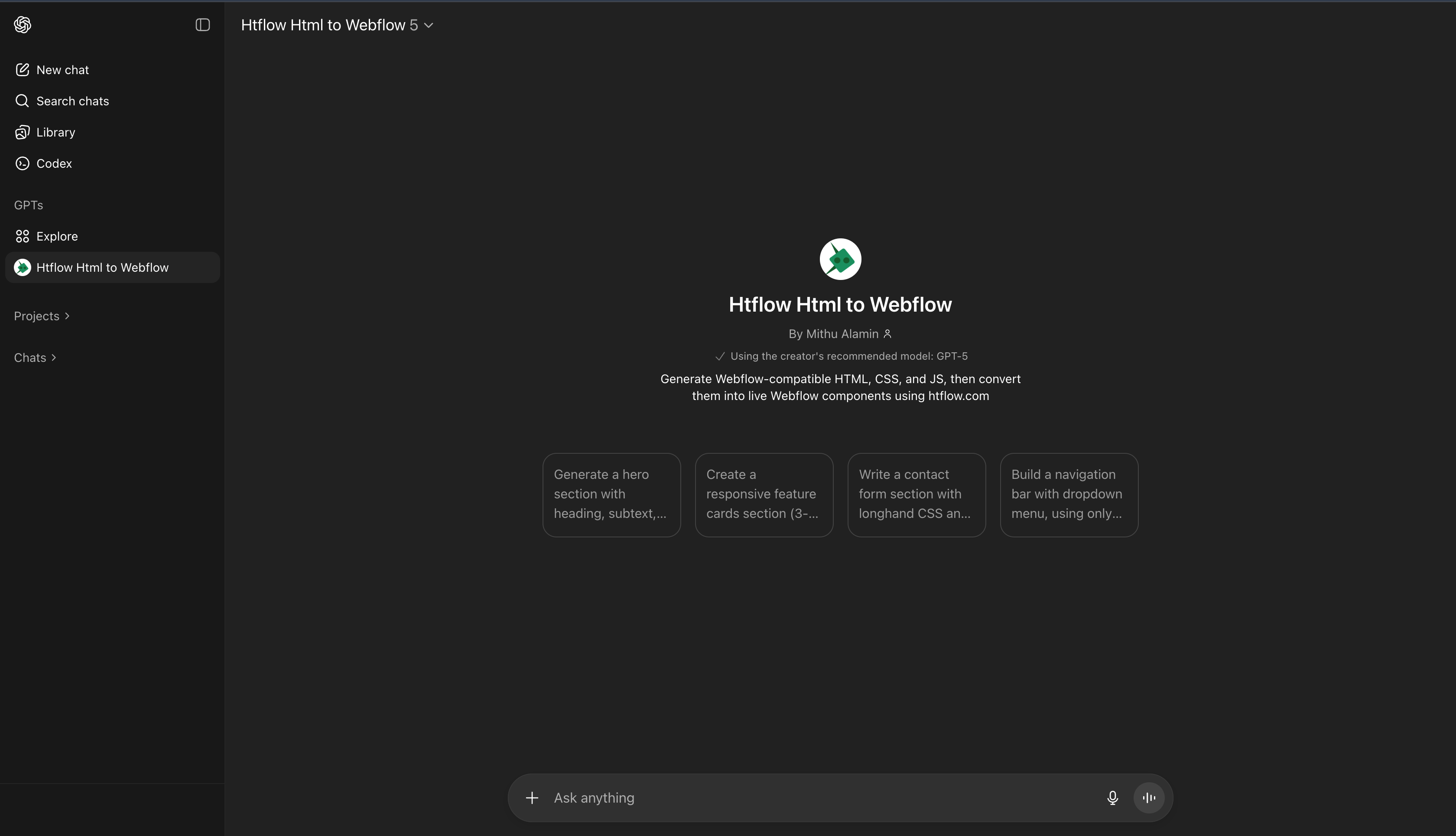
- Pre-trained for Webflow compatibility
- Instant HTML, CSS, and JS generation
- No setup or configuration required
Start Now
Open HTFlow Custom GPT
Step 2: Generate Components
Use simple prompts to generate Webflow-compatible components instantly.Example Prompts:
- “Create a modern hero section with gradient background”
- “Build a pricing table with 3 tiers”
- “Design a contact form with validation”
- “Make a testimonial slider component”
- Clean, semantic HTML structure
- Responsive CSS with Webflow best practices
- Interactive JavaScript elements
- Optimized for Webflow Designer import
Step 3: Convert with HTFlow App
Use the HTFlow Webflow app to convert your generated code into native Webflow components.Conversion Process: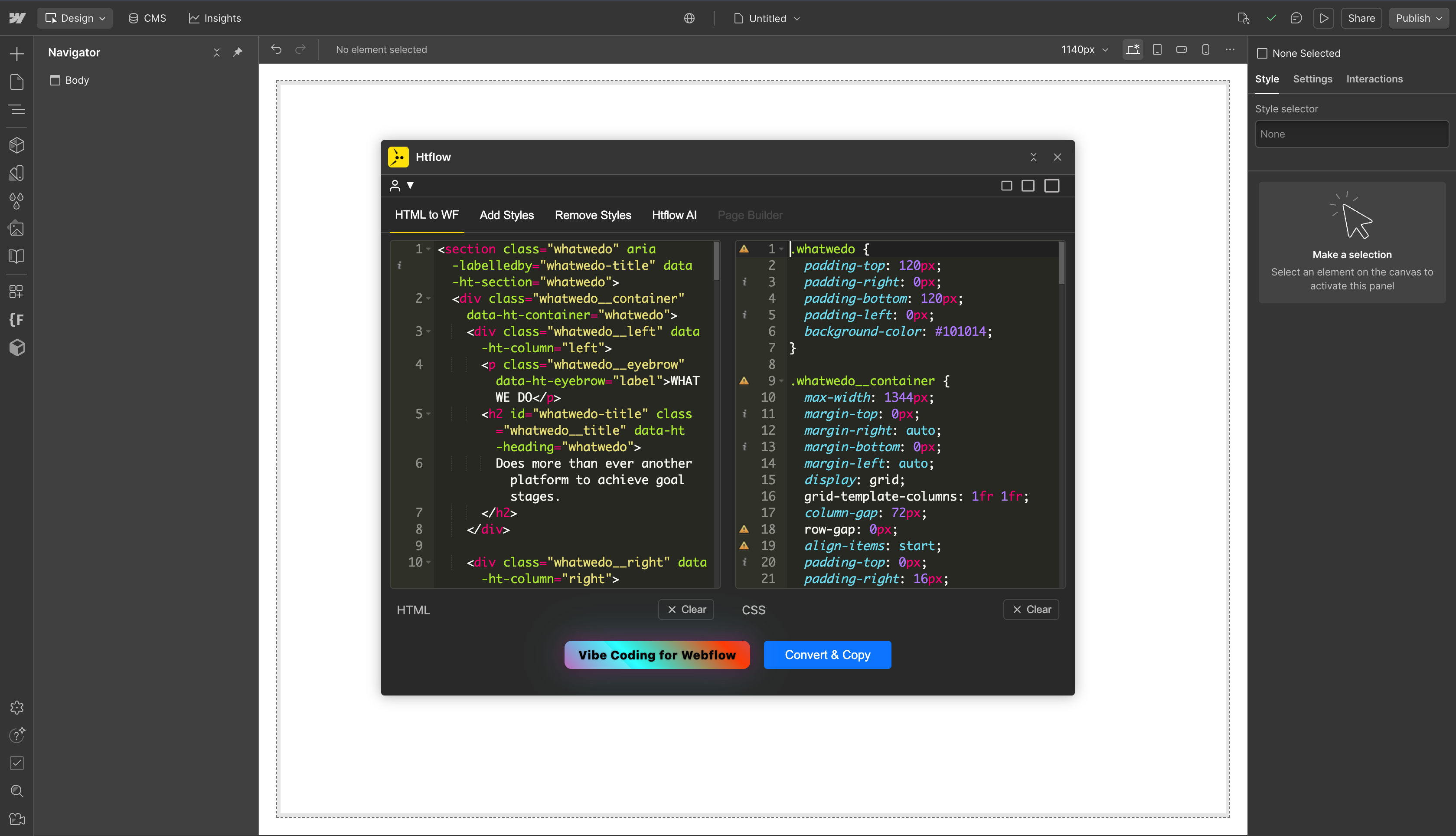
- Copy HTML and CSS from Custom GPT
- Open HTFlow app in Webflow Designer
- Paste your code into the input areas
- Click “Convert & Copy” to get Webflow-ready code
- Paste directly into your Webflow project
Install App
Get HTFlow Webflow App
Step 4: Import to Webflow
Paste the converted code directly into your Webflow project and customize as needed.Import Steps:
- Mac:
Cmd + Vto paste into Webflow Designer - Windows:
Ctrl + Vto paste into Webflow Designer - Customize styling using Webflow’s visual editor
- Add interactions and animations as needed
- Fully responsive components
- Editable Webflow elements
- Clean, optimized code
- Ready for production
Benefits of Using ChatGPT to Webflow Conversion
For Developers
- Faster Prototyping: Generate HTML/CSS components in seconds instead of hours
- Code Quality: Get clean, semantic HTML optimized for Webflow Designer
- Responsive Design: Automatically generate mobile-first, responsive layouts
- Best Practices: Follow Webflow’s design patterns and component structure
For Designers
- No Coding Required: Create complex layouts using simple text prompts
- Visual Control: Maintain full control over design through Webflow’s visual editor
- Consistent Results: Generate professional-quality components every time
- Rapid Iteration: Quickly test different design variations
For Agencies
- Client Delivery: Reduce project timelines and increase client satisfaction
- Scalable Process: Handle multiple projects efficiently with AI assistance
- Quality Assurance: Ensure consistent code quality across all projects
- Cost Effective: Reduce development costs while maintaining high standards
Common Use Cases
- Landing Pages: Create high-converting landing pages with hero sections, features, and CTAs
- E-commerce Sites: Build product catalogs, shopping carts, and checkout flows
- Portfolio Websites: Generate gallery layouts, testimonial sections, and contact forms
- SaaS Applications: Create dashboard interfaces, pricing tables, and feature showcases
- Blog Platforms: Design article layouts, navigation menus, and content grids
Getting Started Today
Ready to revolutionize your web development workflow? Start converting ChatGPT code to Webflow components in minutes:- Access our Custom GPT: HTFlow Custom GPT
- Install HTFlow App: Webflow App Store
- Generate your first component: Use simple prompts to create HTML/CSS
- Convert and import: Transform your code into Webflow components