> ## Documentation Index
> Fetch the complete documentation index at: https://docs.htflow.com/llms.txt
> Use this file to discover all available pages before exploring further.
# ChatGPT to Webflow Converter | AI-Powered HTML CSS to Webflow
> Convert ChatGPT-generated HTML, CSS, and JavaScript into Webflow components instantly. Use our Custom GPT and HTFlow app for seamless AI-to-Webflow workflow.
## What is ChatGPT to Webflow Conversion?
Transform your ChatGPT-generated HTML, CSS, and JavaScript into professional Webflow components with our powerful AI-to-Webflow conversion tools. Our **HTFlow Custom GPT** and **HTFlow Webflow App** create a seamless workflow from AI-generated code to production-ready websites.
### Why Use ChatGPT to Webflow?
* **Speed Up Development**: Convert AI-generated code to Webflow components in seconds
* **Maintain Quality**: Generate clean, semantic HTML optimized for Webflow Designer
* **No Coding Required**: Use simple prompts to create complex web components
* **Professional Results**: Get production-ready, responsive designs every time
## Requirements for ChatGPT to Webflow
To get started with converting ChatGPT code to Webflow, you'll need:
Access to ChatGPT Plus for using Custom GPTs and advanced AI features
Free or paid Webflow account for importing and customizing converted
components
## Tools You'll Use
Generate Webflow-compatible HTML, CSS, and JavaScript components directly in
ChatGPT
Convert your HTML/CSS code into live Webflow components with one click
## Step-by-Step ChatGPT to Webflow Conversion Process
Learn how to transform your ChatGPT-generated code into professional Webflow components with our proven 4-step workflow:
Visit our HTFlow Custom GPT directly in ChatGPT for the most streamlined experience.
**What You Get:**
* Pre-trained for Webflow compatibility
* Instant HTML, CSS, and JS generation
* No setup or configuration required
Open HTFlow Custom GPT
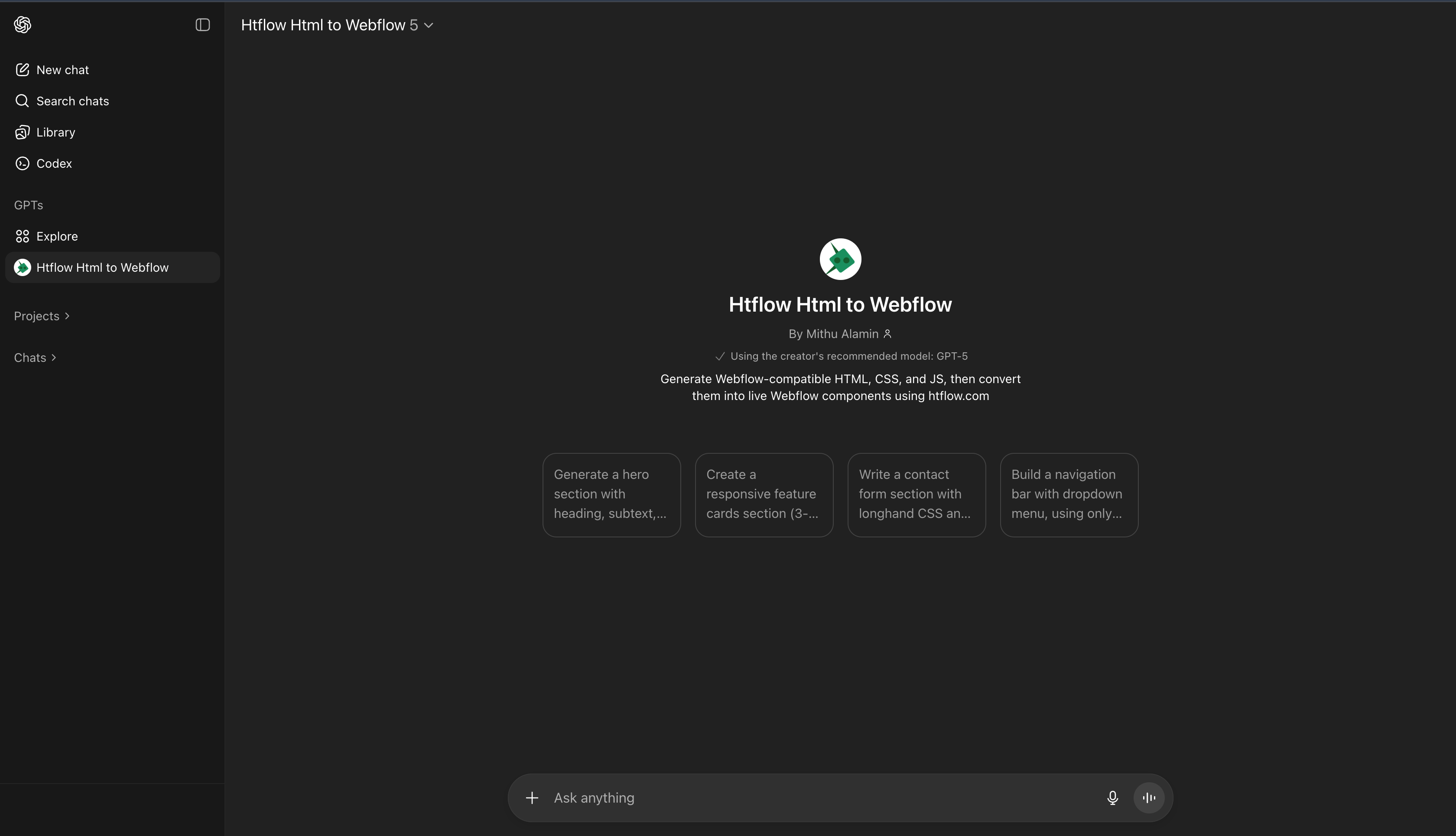 Use simple prompts to generate Webflow-compatible components instantly.
**Example Prompts:**
* "Create a modern hero section with gradient background"
* "Build a pricing table with 3 tiers"
* "Design a contact form with validation"
* "Make a testimonial slider component"
**What You Get:**
* Clean, semantic HTML structure
* Responsive CSS with Webflow best practices
* Interactive JavaScript elements
* Optimized for Webflow Designer import
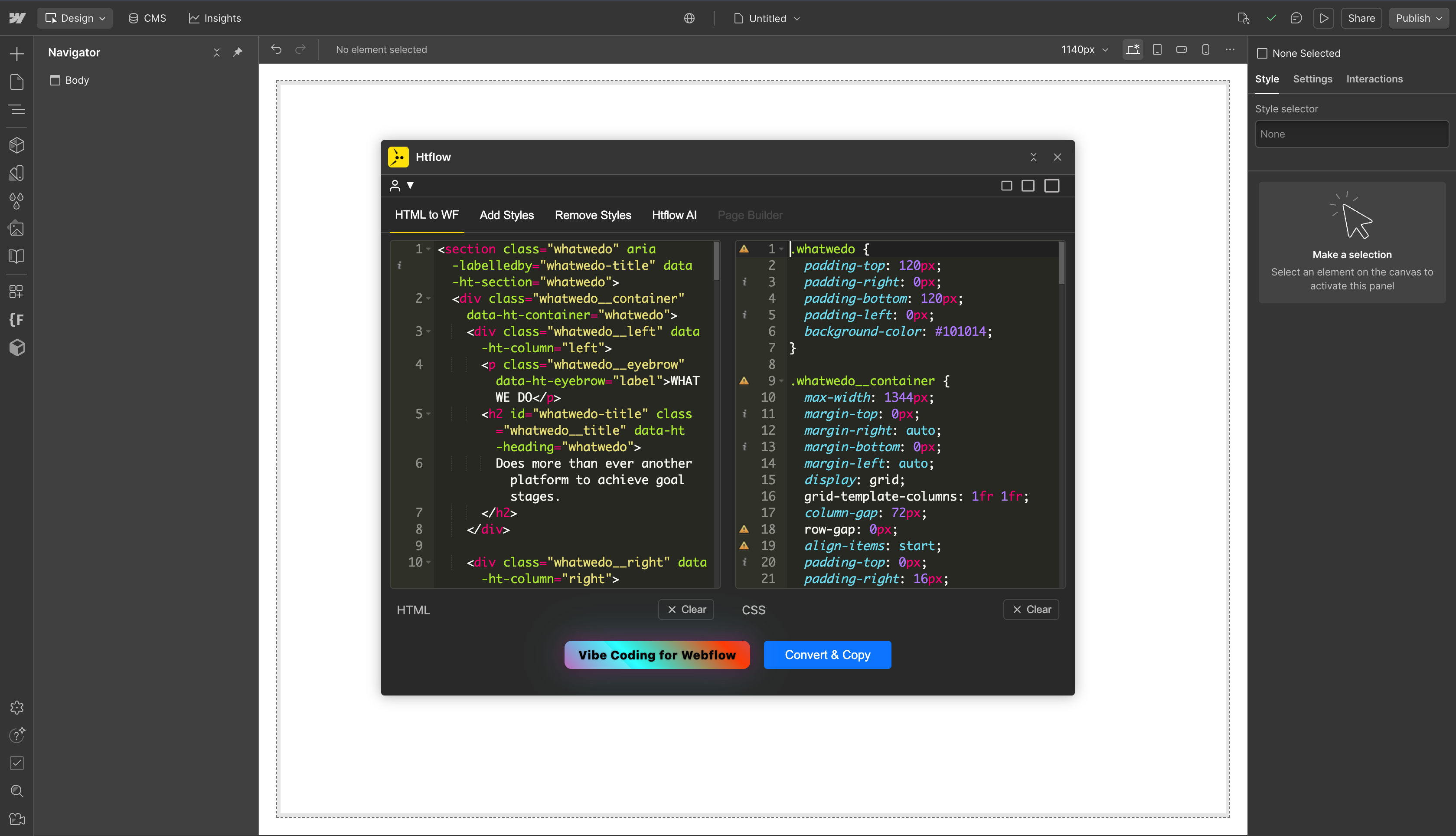
Use the HTFlow Webflow app to convert your generated code into native Webflow components.
**Conversion Process:**
1. Copy HTML and CSS from Custom GPT
2. Open HTFlow app in Webflow Designer
3. Paste your code into the input areas
4. Click "Convert & Copy" to get Webflow-ready code
5. Paste directly into your Webflow project
Get HTFlow Webflow App
Use simple prompts to generate Webflow-compatible components instantly.
**Example Prompts:**
* "Create a modern hero section with gradient background"
* "Build a pricing table with 3 tiers"
* "Design a contact form with validation"
* "Make a testimonial slider component"
**What You Get:**
* Clean, semantic HTML structure
* Responsive CSS with Webflow best practices
* Interactive JavaScript elements
* Optimized for Webflow Designer import
Use the HTFlow Webflow app to convert your generated code into native Webflow components.
**Conversion Process:**
1. Copy HTML and CSS from Custom GPT
2. Open HTFlow app in Webflow Designer
3. Paste your code into the input areas
4. Click "Convert & Copy" to get Webflow-ready code
5. Paste directly into your Webflow project
Get HTFlow Webflow App
 Paste the converted code directly into your Webflow project and customize as needed.
**Import Steps:**
* **Mac**: `Cmd + V` to paste into Webflow Designer
* **Windows**: `Ctrl + V` to paste into Webflow Designer
* Customize styling using Webflow's visual editor
* Add interactions and animations as needed
**Result:**
* Fully responsive components
* Editable Webflow elements
* Clean, optimized code
* Ready for production
## Benefits of Using ChatGPT to Webflow Conversion
### For Developers
* **Faster Prototyping**: Generate HTML/CSS components in seconds instead of hours
* **Code Quality**: Get clean, semantic HTML optimized for Webflow Designer
* **Responsive Design**: Automatically generate mobile-first, responsive layouts
* **Best Practices**: Follow Webflow's design patterns and component structure
### For Designers
* **No Coding Required**: Create complex layouts using simple text prompts
* **Visual Control**: Maintain full control over design through Webflow's visual editor
* **Consistent Results**: Generate professional-quality components every time
* **Rapid Iteration**: Quickly test different design variations
### For Agencies
* **Client Delivery**: Reduce project timelines and increase client satisfaction
* **Scalable Process**: Handle multiple projects efficiently with AI assistance
* **Quality Assurance**: Ensure consistent code quality across all projects
* **Cost Effective**: Reduce development costs while maintaining high standards
## Common Use Cases
* **Landing Pages**: Create high-converting landing pages with hero sections, features, and CTAs
* **E-commerce Sites**: Build product catalogs, shopping carts, and checkout flows
* **Portfolio Websites**: Generate gallery layouts, testimonial sections, and contact forms
* **SaaS Applications**: Create dashboard interfaces, pricing tables, and feature showcases
* **Blog Platforms**: Design article layouts, navigation menus, and content grids
## Getting Started Today
Ready to revolutionize your web development workflow? Start converting ChatGPT code to Webflow components in minutes:
1. **Access our Custom GPT**: [HTFlow Custom GPT](https://chatgpt.com/g/g-68f0dcfaca7c81918ff288634d24b792-htflow-html-to-webflow)
2. **Install HTFlow App**: [Webflow App Store](https://webflow.com/apps/detail/htflow)
3. **Generate your first component**: Use simple prompts to create HTML/CSS
4. **Convert and import**: Transform your code into Webflow components
Transform your AI-generated ideas into professional websites with ChatGPT to Webflow conversion today!
Paste the converted code directly into your Webflow project and customize as needed.
**Import Steps:**
* **Mac**: `Cmd + V` to paste into Webflow Designer
* **Windows**: `Ctrl + V` to paste into Webflow Designer
* Customize styling using Webflow's visual editor
* Add interactions and animations as needed
**Result:**
* Fully responsive components
* Editable Webflow elements
* Clean, optimized code
* Ready for production
## Benefits of Using ChatGPT to Webflow Conversion
### For Developers
* **Faster Prototyping**: Generate HTML/CSS components in seconds instead of hours
* **Code Quality**: Get clean, semantic HTML optimized for Webflow Designer
* **Responsive Design**: Automatically generate mobile-first, responsive layouts
* **Best Practices**: Follow Webflow's design patterns and component structure
### For Designers
* **No Coding Required**: Create complex layouts using simple text prompts
* **Visual Control**: Maintain full control over design through Webflow's visual editor
* **Consistent Results**: Generate professional-quality components every time
* **Rapid Iteration**: Quickly test different design variations
### For Agencies
* **Client Delivery**: Reduce project timelines and increase client satisfaction
* **Scalable Process**: Handle multiple projects efficiently with AI assistance
* **Quality Assurance**: Ensure consistent code quality across all projects
* **Cost Effective**: Reduce development costs while maintaining high standards
## Common Use Cases
* **Landing Pages**: Create high-converting landing pages with hero sections, features, and CTAs
* **E-commerce Sites**: Build product catalogs, shopping carts, and checkout flows
* **Portfolio Websites**: Generate gallery layouts, testimonial sections, and contact forms
* **SaaS Applications**: Create dashboard interfaces, pricing tables, and feature showcases
* **Blog Platforms**: Design article layouts, navigation menus, and content grids
## Getting Started Today
Ready to revolutionize your web development workflow? Start converting ChatGPT code to Webflow components in minutes:
1. **Access our Custom GPT**: [HTFlow Custom GPT](https://chatgpt.com/g/g-68f0dcfaca7c81918ff288634d24b792-htflow-html-to-webflow)
2. **Install HTFlow App**: [Webflow App Store](https://webflow.com/apps/detail/htflow)
3. **Generate your first component**: Use simple prompts to create HTML/CSS
4. **Convert and import**: Transform your code into Webflow components
Transform your AI-generated ideas into professional websites with ChatGPT to Webflow conversion today!